

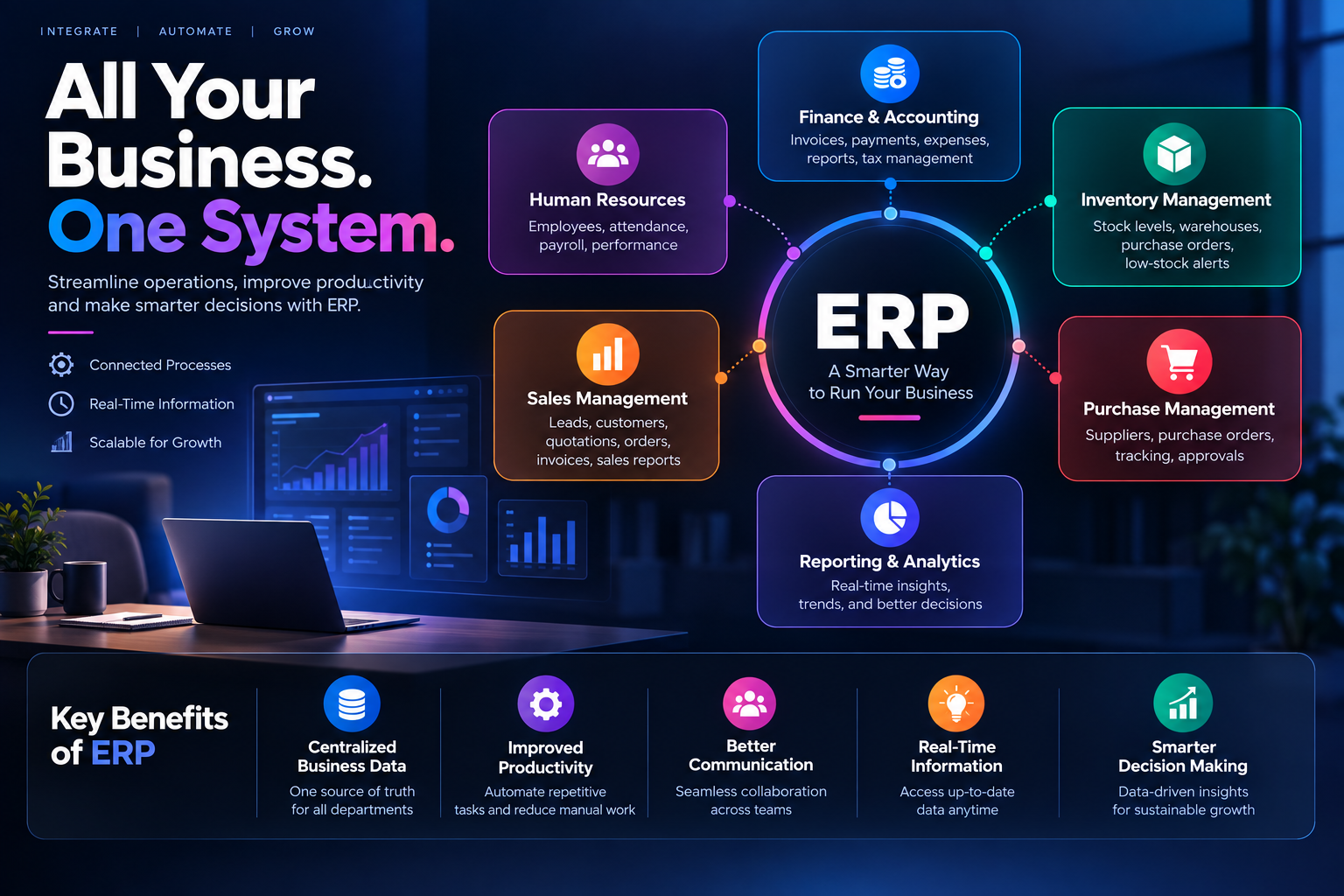
What Is ERP Software? A Complete Guide for Modern Businesses
In today's competitive business environment, managing different departments, employees, customers, finances, inventory, and daily operations can become challenging. Businesses often use multiple software systems to manage different processes, which can lead to data duplication, communication gaps, and inefficient workflows.
This is where ERP software can help.
ERP, or Enterprise Resource Planning, is a business management solution that brings different business processes together in one centralized system. It helps organizations manage operations, improve productivity, access real-time information, and make better business decisions.
In this guide, we will explain what ERP software is, how it works, its key features and benefits, and why businesses should consider implementing an ERP system.
What Is ERP Software?
ERP software is a centralized business management system designed to manage and automate different organizational processes from a single platform.
Instead of using separate systems for accounting, inventory, sales, purchasing, human resources, and other operations, an ERP system connects these functions and allows them to work together.
For example, when a sales order is created, the ERP system can automatically update inventory, generate the required financial information, and provide the relevant data to other departments.
This creates a connected business environment where teams can work with the same information. Companies like Teenva AI & Digital Ventures design ERP systems around this exact idea — one source of truth that every department can rely on.
How Does ERP Software Work?
ERP software works by connecting multiple business departments through a centralized database. Different departments can access the information they need according to their roles and permissions.
A typical ERP workflow looks like this:

Instead of entering the same information into multiple systems, data flows between connected modules automatically. This reduces manual data entry and helps businesses maintain more accurate and consistent information.
Key ERP Software Modules
Modern ERP systems can include different modules depending on the business requirements.

1. Finance and Accounting
The finance module helps businesses manage financial activities such as:
Invoices
Payments
Expenses
Accounts receivable
Accounts payable
Financial reports
Tax-related records
Cash flow management
Having financial information connected with other business processes helps management get a clearer view of the company's financial performance.
2. Inventory Management
Inventory management is important for businesses that sell or manufacture products. An ERP system can help businesses monitor:
Stock levels
Product movement
Warehouses
Stock transfers
Purchase orders
Low-stock items
Inventory history
Real-time inventory information can help reduce both overstocking and stock shortages.
3. Sales Management
ERP software can help manage the complete sales process, including:
Leads
Customers
Quotations
Sales orders
Invoices
Payments
Sales reports
Connecting sales data with inventory and finance makes it easier to track the complete order-to-payment process.
4. Purchase Management
The purchase module helps businesses manage suppliers and purchasing activities, including supplier management, purchase requests, purchase orders, supplier invoices, purchase tracking, and approval workflows. This helps organizations maintain better control over purchasing expenses.
5. Human Resource Management
ERP platforms can also include HR functionality for managing employee-related information such as employee profiles, attendance, leave, departments, payroll, employee documents, and performance information. Integrating HR with other business operations reduces repetitive administrative work.
6. Reporting and Analytics
ERP software collects information from different departments and turns it into useful reports covering sales performance, revenue, expenses, inventory, purchases, employee information, and overall business performance. Management can use these reports to identify trends and make data-driven decisions.
Benefits of ERP Software for Businesses
Implementing ERP software can provide several benefits for organizations.
Centralized Business Data — Instead of storing important information across multiple disconnected applications, businesses can manage their data through one integrated platform.
Improved Productivity — ERP automation reduces repetitive manual tasks such as invoice generation, inventory updates, approvals, and reporting, freeing employees for more productive work.
Better Communication Between Departments — Connected systems let employees access relevant information without repeatedly requesting data from other teams, improving collaboration across sales, finance, HR, inventory, and management.
Reduced Data Duplication — With a centralized ERP system, information is entered once and shared with authorized departments, reducing errors and duplicate records.
Real-Time Business Visibility — Decision-makers can monitor sales, inventory, expenses, and financial performance from one platform.
Better Decision-Making — Accurate, accessible data helps businesses rely on centralized reports and analytics instead of scattered spreadsheets.
Scalability — A scalable ERP system lets businesses add users, departments, locations, workflows, and modules as requirements change.
Who Can Use ERP Software?
ERP software is not limited to large enterprises. Small and medium-sized businesses can also benefit from ERP solutions, across industries such as:
Manufacturing
Retail
E-commerce
Education
Healthcare
Logistics
Construction
Professional services
Distribution
Hospitality
The ideal ERP solution depends on the organization's size, industry, workflow, and business requirements.
Custom ERP Software vs Ready-Made ERP
Businesses generally have two major options when choosing an ERP solution: a ready-made ERP system or custom ERP software.
Ready-Made ERP
A ready-made ERP comes with predefined features and workflows. Advantages include faster implementation, existing features, established workflows, and potentially lower initial development costs. However, businesses may need to adjust their processes according to the software's limitations.
Custom ERP Software
Custom ERP software is developed according to the specific requirements of a business. It can be designed around existing workflows, industry requirements, user roles, integrations, and business processes, offering customized workflows, flexible features, business-specific modules, custom integrations, and greater control over the system.
For businesses with unique processes, a custom ERP solution — like the ones Teenva AI & Digital Ventures builds for travel, healthcare, e-commerce, and retail companies — can be a more suitable option.
How to Choose the Right ERP Software
Choosing an ERP system requires careful planning. Before selecting a solution, businesses should consider:
Business Requirements — Identify which processes need automation and which departments will use the system.
Required Modules — Determine whether you need accounting, inventory, sales, purchasing, HR, manufacturing, or reporting modules.
Scalability — Make sure the software can support future business growth.
Security — Check the system's authentication, authorization, data protection, backup, and access-control capabilities.
Integration — Consider whether the ERP needs to integrate with payment gateways, CRM platforms, e-commerce platforms, accounting tools, or third-party APIs.
User Experience — The interface should be simple, intuitive, and suitable for different user roles.
Cost — Consider the complete cost, including development or licensing, implementation, customization, maintenance, hosting, training, and future upgrades.
Why Businesses Are Moving Toward ERP Automation
Businesses generate large amounts of data every day. Managing this information manually through spreadsheets and disconnected applications becomes difficult as operations grow.
ERP software brings business processes together and creates a more structured workflow. Automation reduces repetitive tasks, improves data consistency, and gives management faster access to important business information.
The goal of ERP is not simply to replace spreadsheets. The larger objective is to create a connected business environment where information moves efficiently between departments.
Final Thoughts
ERP software helps businesses manage their operations through a centralized and integrated platform. From finance and inventory to sales, purchasing, HR, and reporting, ERP connects important business processes and reduces operational complexity.
The right ERP solution depends on the organization's specific requirements, industry, size, budget, and future growth plans.
Frequently Asked Questions About ERP Software
What does ERP stand for? ERP stands for Enterprise Resource Planning.
What is the main purpose of ERP software? The main purpose of ERP software is to integrate and manage different business processes through a centralized system.
Is ERP software only for large companies? No. Small and medium-sized businesses can also use ERP software to manage operations and automate business processes.
What are the most common ERP modules? Common ERP modules include finance and accounting, inventory, sales, purchasing, human resources, reporting, and analytics.
What is the difference between ERP and CRM? ERP primarily focuses on managing internal business operations such as finance, inventory, purchasing, and resources. CRM focuses mainly on customer relationships, sales, leads, and customer interactions.
Is custom ERP better than ready-made ERP? It depends on the business. Ready-made ERP can be suitable for standard business processes, while custom ERP can be more appropriate when a company has unique workflows or specific requirements.
Can ERP software be integrated with other applications? Yes. ERP systems can often be integrated with applications such as payment gateways, e-commerce platforms, CRM systems, accounting tools, and other business applications through APIs or other integration methods.
Looking to build a custom ERP system for your business? Teenva AI & Digital Ventures designs and develops tailored ERP solutions for travel, healthcare, e-commerce, and retail businesses. Get in touch at sales@teenvaai.com, call +91 9572020107, or visit teenvaai.com to discuss your requirements.