
ERP in Procurement: Benefits, Stages, and How It Works (2026)
Procurement rarely works alone. Every purchase touches budgets, stock levels, supplier contracts, shipping, and payments. When each of those lives in a different spreadsheet or tool, teams end up with mismatched numbers, late approvals, duplicate orders, and missed savings. ERP in procurement solves this by putting purchasing on the same platform as the rest of the business.
This guide explains what ERP in procurement means, the benefits it delivers, the seven stages of the procurement process, the modules that matter most, and how to get more value from your system.
What Is ERP in Procurement?
ERP (Enterprise Resource Planning) in procurement is a unified software platform that connects the purchasing function with accounting, order management, inventory, logistics, supply chain, and HR. Instead of working from isolated data, procurement teams see real-time information from every department and use it to make better sourcing and spending decisions.
In practice, a buyer can enter quotes and order details, track purchase orders from creation to fulfilment, compare supplier offers, and check inventory, all in one place. Once a quote is accepted, the ERP links the related invoices, shipments, and payments automatically.
Key Takeaways
- ERP replaces data silos with one real-time view of procurement and the wider business.
- Automation handles repetitive work such as purchase order creation, invoice matching, and vendor performance tracking.
- Centralized supplier data leads to stronger negotiations and smoother vendor relationships.
- Unlike standalone procurement tools, ERP ties purchasing directly to budgets, stock levels, and demand planning.
Why the Right ERP Matters for Procurement
Procurement depends on operations, finance, logistics, and suppliers working in sync. A well-chosen ERP gives the team a shared workspace where they can:
- Maintain approved vendor and supplier lists
- Automate quote requests and compare responses side by side
- Track purchase orders as they are generated and fulfilled
- Monitor inventory and set automatic reorder thresholds
- Plan future purchases using historical data
Over time, this shared visibility exposes cost-saving opportunities and improves accuracy, speed, and productivity.
Key Benefits of Using ERP for Procurement
1. Procurement Automation
Once configured, much of the buying cycle can run on its own. The system tracks stock, raises orders when thresholds are hit, and routes approvals. Whether you are keeping retail shelves full or supplying a just-in-time production line, automation reduces manual effort and lowers the working capital tied up in inventory.
2. Accurate Cost Tracking
ERP records the full cost of every purchase, including product price, shipping, taxes, and other charges. This keeps financial forecasts realistic and shows where unit costs can be trimmed. Even a small reduction in cost per unit adds up to large savings at scale.
3. Supplier Relationship Management
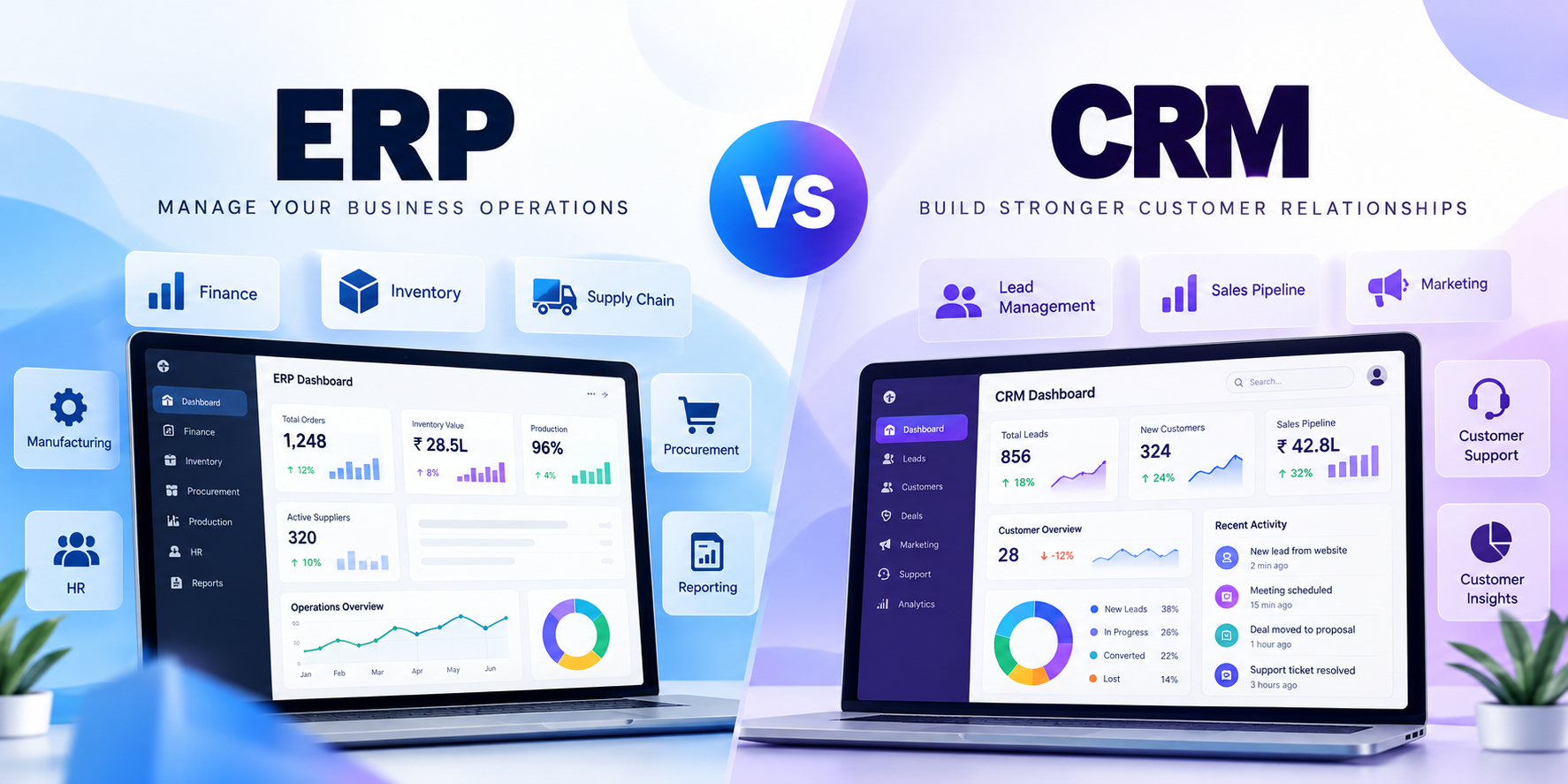
As a business grows, keeping track of dozens or hundreds of vendors becomes difficult. ERP stores contracts, pricing, purchase orders, deliveries, and payments for each supplier in one record, so everyone sees the same relationship status. Just as a CRM manages customers, your ERP manages vendors.
4. A Single Source of Truth
When every department keeps its own numbers, reports disagree and decisions suffer. ERP gives everyone involved in ordering one trusted dataset.
5. Reporting and Analytics
Dashboards and automated reports can compare suppliers on cost, defect rates, and delivery times, helping you decide who deserves more business and who needs a conversation.
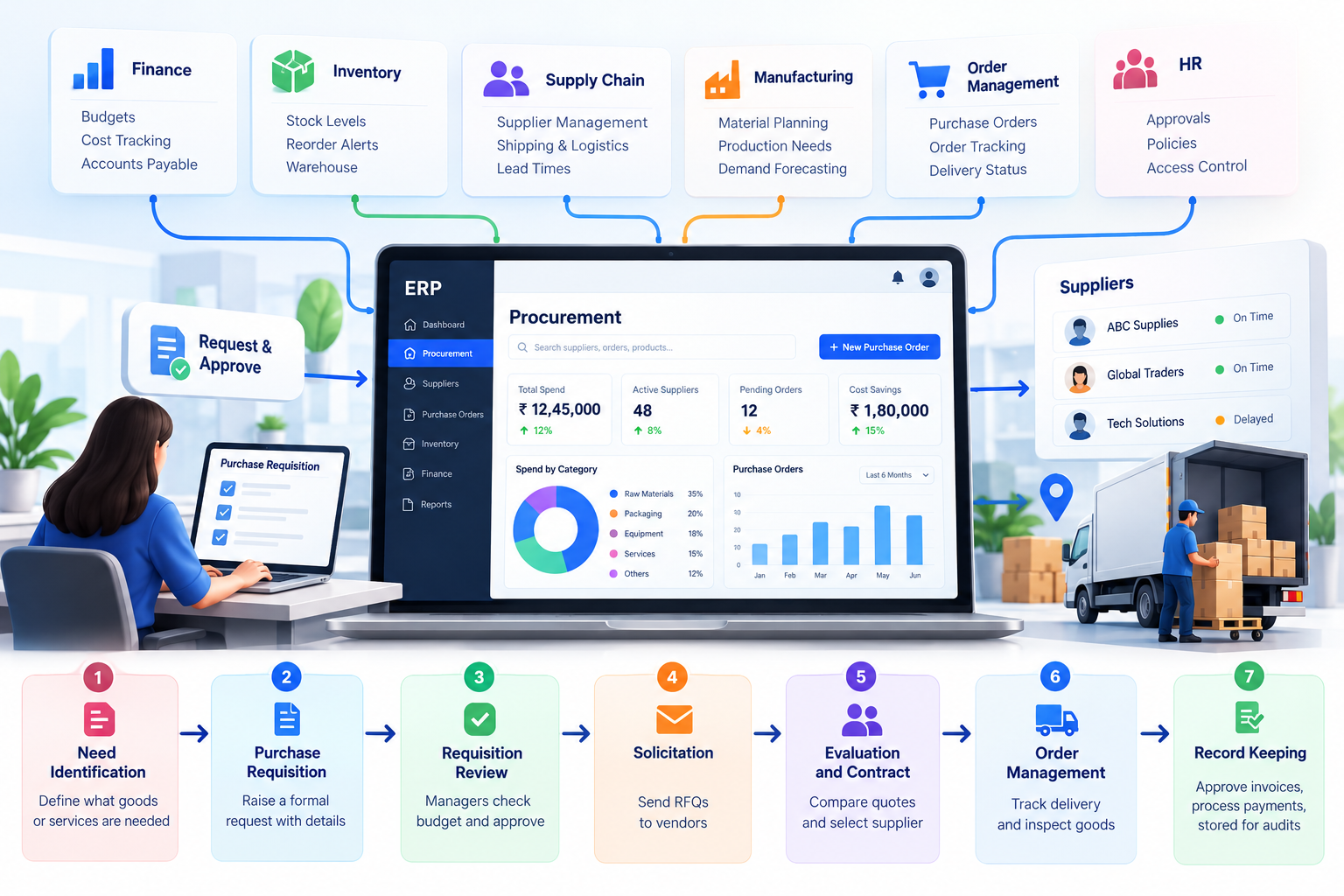
The 7 Stages of Procurement in an ERP System
ERP supports a structured procurement cycle that saves both time and money:
| Stage | What Happens |
|---|---|
| 1. Need Identification | The business defines what goods or services it needs, at what cost and timeline. |
| 2. Purchase Requisition | A formal request is raised by an internal user or customer, detailing requirements. |
| 3. Requisition Review | Managers check budget availability and confirm the need. |
| 4. Solicitation | Once approved, a purchase plan is prepared and requests for quotation (RFQs) go to vendors. |
| 5. Evaluation and Contract | Bids are compared, a supplier is chosen, the contract is finalized, and the purchase order is accepted. |
| 6. Order Management | The vendor delivers, and the buyer inspects the order and flags any issues. |
| 7. Record Keeping | Invoices are approved or disputed, payments are processed, and records are stored for audits. |
ERP Modules That Improve Procurement
Beyond the core procurement module, several others work closely with it:
- Finance: Tracks procurement costs and accounts payable, and can automatically match purchase orders to invoices and receipts before releasing payment.
- Manufacturing: Supports material requirements planning (MRP) so production teams get materials at the right time.
- Inventory Management: Shows what is in stock, what is incoming or outgoing, and how much cash is tied up in inventory.
- Order Management: Tracks orders from creation to delivery so anyone with access can check status in a few clicks.
- Supply Chain Management: Follows goods through the full supply chain, including typical shipping costs and lead times.
- Service Resource Management: Handles one-off projects that fall outside regular procurement cycles.
7 Ways to Optimize Procurement With ERP
- Supplier relationship management: Keep communication, contracts, and pricing history in one place so new team members can get up to speed quickly.
- Sourcing: Review past purchases and compare sourcing options, with the system calculating and comparing quotes.
- Contract management: Get alerts before contracts expire and use performance history to prepare for negotiations.
- Order management: Match orders, shipping data, and payments end to end. Automated matching beats manual checking, especially at high volumes.
- Requisitioning: Process quotes automatically during RFP cycles and keep all communication on record.
- Payment processing: Connect orders to payments to remove paper checks and signature chases. Mismatches trigger alerts to accounts payable.
- Purchase planning: Use cost and inventory insights to plan for seasonal demand, one-time projects, and recurring needs.
ERP vs. E-Procurement: What Is the Difference?
Both help businesses buy materials and process payments, but their scope differs.
E-procurement platforms focus only on procurement tasks such as sourcing, bid management, supplier communication, and purchase workflows. They suit businesses with an isolated procurement process or limited needs.
ERP takes a broader view. When a purchase order is approved, the ERP updates financial commitments, adjusts inventory forecasts, notifies the receiving team, and triggers downstream workflows with no manual handoffs. Companies with volatile production schedules or seasonal cash flow often benefit most from this connected approach.
How to Choose the Right ERP for Procurement
Do not decide on price or convenience alone. Look at the features, how well the system fits your existing processes, and both direct and indirect savings. You will also need to choose between a cloud ERP, which gives teams secure access from anywhere without maintaining servers, and a self-hosted ERP, which offers more control but higher infrastructure overhead.
Common Challenges of ERP Adoption in Procurement
- Data migration: Moving data from incompatible legacy systems takes planning.
- Change management: Staff may resist new workflows without proper training and buy-in.
- Configuration: The system must be set up to match your approval rules and processes.
Implementation can take a few months for an out-of-the-box cloud system, and over a year for a heavily customized on-premises one, depending on data migration and integrations.
Frequently Asked Questions
What are the challenges of adopting ERP for procurement? Typical challenges include migrating legacy data, winning staff buy-in, and configuring the system to match existing processes.
How long does it take to implement ERP for procurement? From a few months for a standard cloud deployment to more than a year for a heavily customized on-premises system.
How does ERP help with supplier management? It centralizes contracts, pricing, order history, and performance metrics, giving teams a consistent way to evaluate vendors, negotiate, and onboard new suppliers.
Conclusion
ERP lifts procurement from manual processes and disconnected spreadsheets to a connected, data-driven function. It helps teams track costs, align purchasing with demand and inventory, manage suppliers, and decide faster. Done right, procurement stops being a cost center and becomes a strategic advantage.
Build Your ERP Procurement System With Teenva AI
At Teenva AI & Digital Ventures, we design and implement customized ERP solutions, including procurement, inventory, finance, and supplier management modules, tailored to your workflows and integrated with your existing systems. Whether you need a new ERP built, your current one integrated, or procurement processes automated, our team can help.
Contact us at sales@teenvaai.com, call +91 9572020107, or visit teenvaai.com to get started.