

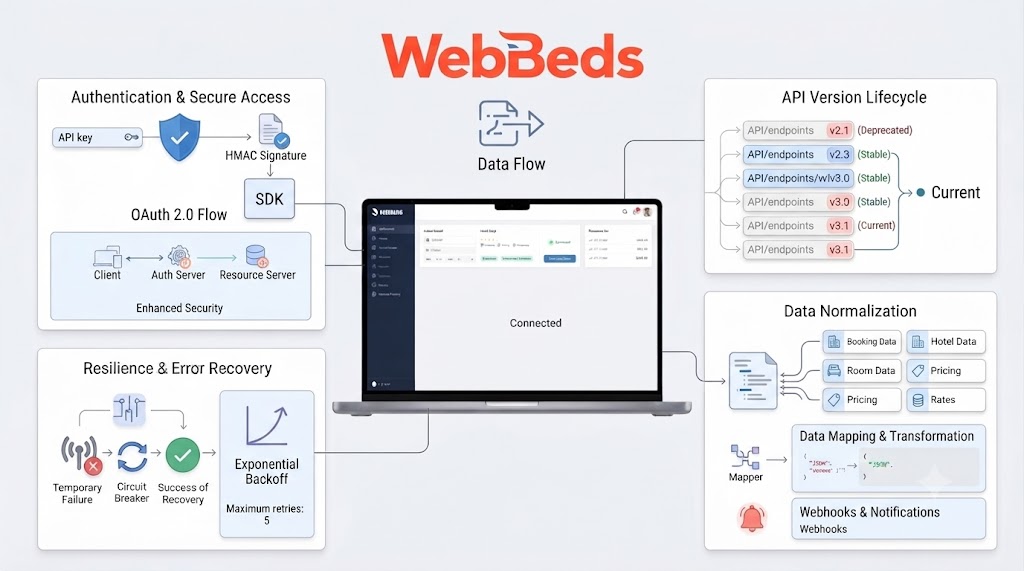
WebBeds API Documentation: Complete Integration Guide
Every hotel API integration starts with the same thing: the documentation. For a large wholesaler like WebBeds, the documentation is where you learn how to authenticate, search inventory, price rooms, create bookings, and handle errors. Reading it well can save weeks of rework. This guide explains how to approach WebBeds API documentation, what to look for in each section, and how to turn it into a working integration for your travel platform.
Note: WebBeds provides its official documentation and credentials to approved partners, and details such as endpoints, formats, and field names can change. Use this guide as a roadmap and always follow the official documentation you receive for exact technical specifications.
What Is the WebBeds API?
WebBeds is one of the largest hotel wholesalers, and its API lets travel businesses connect to its accommodation inventory. A typical integration allows your platform to search hotels, view property and room details, check live rates and availability, and create or cancel bookings. For online travel agencies, tour operators, and B2B portals, it is a way to offer a wide hotel catalog without contracting each property individually.
What to Expect in the Documentation
Hotel API documentation usually follows a similar structure. Knowing the sections in advance helps you read it efficiently.
Documentation Section | What It Covers | Why It Matters |
|---|---|---|
Overview and getting started | Account setup, environments, onboarding steps | Tells you how to get access and what comes first |
Authentication | Credentials, tokens or keys, security rules | Required before any request works |
Static content | Hotel lists, descriptions, images, facilities, location data | Powers your property pages and filters |
Search and availability | Request parameters, rate and room responses | Core of your search results page |
Pricing and rates | Rate types, taxes, fees, currencies, cancellation terms | Determines what price you show and charge |
Booking | Booking creation, guest details, confirmation references | Completes the sale |
Booking management | Retrieval, modification, cancellation | Supports customer service |
Error codes | Messages, causes, recommended handling | Helps you build reliable error handling |
Rate limits and best practices | Request limits, caching advice, performance tips | Prevents throttling and slow pages |
Testing and certification | Test data, scenarios, go-live checklist | Required before production access |
Step-by-Step Integration Guide
Step 1: Get Access and Read Everything First
Obtain your commercial agreement, credentials, and test environment access. Before coding, read the full documentation once end to end, then re-read the sections for the features you will build first. Note anything unclear and ask your WebBeds contact early.
Step 2: Set Up Authentication and Environments
Configure separate settings for test and production. Store credentials securely on your server, never in browser code or public repositories, and make sure all traffic uses HTTPS.
Step 3: Load and Manage Static Content
Static content such as hotel names, descriptions, photos, and amenities changes slowly. Plan how to import it, store it, and refresh it on a schedule. Having this data locally makes your pages faster and your search more flexible.
Step 4: Build Search and Availability
Map your search form to the documented request parameters, typically destination, dates, number of rooms, and guest details. Parse the response into hotels, room types, and rates, and display cancellation terms clearly.
Step 5: Handle Pricing Correctly
Check how the documentation describes taxes, fees, currencies, and rate types. Decide where your markup is applied and make sure the price at search matches the price at booking.
Step 6: Implement Booking
Before confirming, recheck availability and price. Then send guest details and booking data exactly as documented and store the confirmation reference returned. Plan what happens if a booking request fails or times out so you never create duplicate bookings.
Step 7: Add Booking Management
Build retrieval and cancellation features so your support team and customers can manage reservations without contacting you.
Step 8: Build Error Handling and Logging
Use the documented error codes to create clear customer messages and internal alerts. Log requests and responses so you can diagnose problems quickly.
Step 9: Test and Certify
Follow the documented test scenarios, fix issues, and complete any certification step before requesting production access.
Step 10: Launch and Monitor
Go live gradually, watch error rates and response times, and review bookings for accuracy in the first weeks.
Integration Flow
Direct Integration or a Connectivity Layer?
You have two main routes to WebBeds inventory:
Direct integration: you build against the WebBeds documentation yourself. This gives you full control and no middle layer, but it requires development time, testing, certification, and ongoing maintenance.
Connectivity or aggregation layer: some providers, such as Vervotech, maintain supplier integrations and expose them through a single endpoint. Vervotech states that it maintains a certified WebBeds integration and offers it through one canonical REST endpoint, so a team writes one integration instead of one per supplier. Speed claims such as hours instead of months depend on your setup, so verify scope, pricing, and support with any provider before deciding.
A direct integration suits teams with developer capacity and a need for deep control. A connectivity layer suits teams that want many suppliers quickly and prefer to avoid maintaining each connection.
Best Practices When Working With the Documentation
Version awareness: check which API version you are building against and watch for update announcements.
Keep a field map: document how API fields match your own database and interface fields.
Use real examples: test with sample requests and responses from the documentation before using live data.
Cache wisely: cache static content, but fetch live availability and prices.
Prepare for edge cases: handle sold-out rooms, rate changes, partial failures, and timeouts.
Document your own work: a short internal guide helps new developers maintain the integration.
Frequently Asked Questions
Where can I find WebBeds API documentation? Official documentation is typically shared with approved partners during onboarding, so contact WebBeds or your account manager for access.
Do I need an agreement before I can use the API? Usually yes. Access and credentials are normally provided after a commercial agreement.
Should I cache hotel data? Cache static content such as descriptions and photos, but always request live availability and prices.
How long does an integration take? It depends on your platform, the features you build, and the testing requirements. A direct integration often takes weeks to months, while connectivity layers may shorten the timeline.
What is the biggest mistake teams make? Starting to code before fully reading the documentation, especially the pricing, booking, and error-handling sections.
The Bottom Line
WebBeds API documentation is the foundation of a successful integration. Read it fully, follow its structure from authentication to certification, build search, pricing, and booking carefully, and plan for errors and maintenance. Whether you integrate directly or use a connectivity layer, a clear understanding of the documentation will make your hotel booking platform faster to launch and more reliable for customers.