
What Is ERP? A Complete Guide to Enterprise Resource Planning
Most growing businesses hit the same wall. Finance keeps its numbers in one tool, sales tracks orders in another, and the warehouse relies on spreadsheets nobody else can see. Every report needs manual stitching, and every decision is based on data that is already out of date.
This is the problem ERP exists to solve.
What Is ERP?
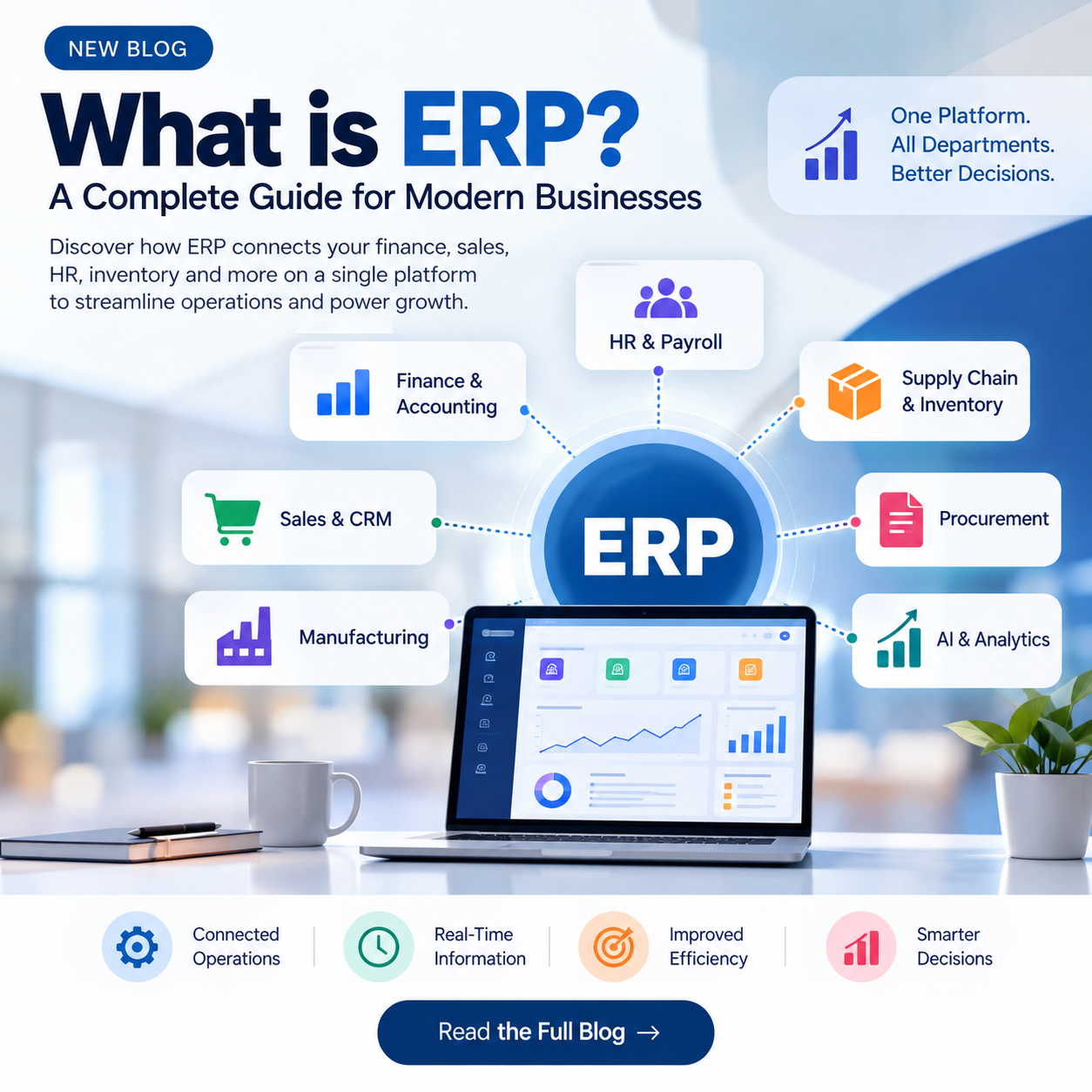
ERP (Enterprise Resource Planning) is a software system that connects the core processes of a business, such as finance, HR, manufacturing, supply chain, sales and procurement, on a single platform. All departments read from and write to the same shared database, which gives the organisation one source of truth.
A simple way to picture it: think of a company as a human body. Sales, logistics, finance and procurement are vital functions, and each depends on the others. When one breaks down, the rest feel it. ERP acts as the central nervous system that keeps them coordinated.
How Did ERP Evolve?
ERP has a long history, from paper-based production scheduling to the powerful, AI-assisted platforms of today.
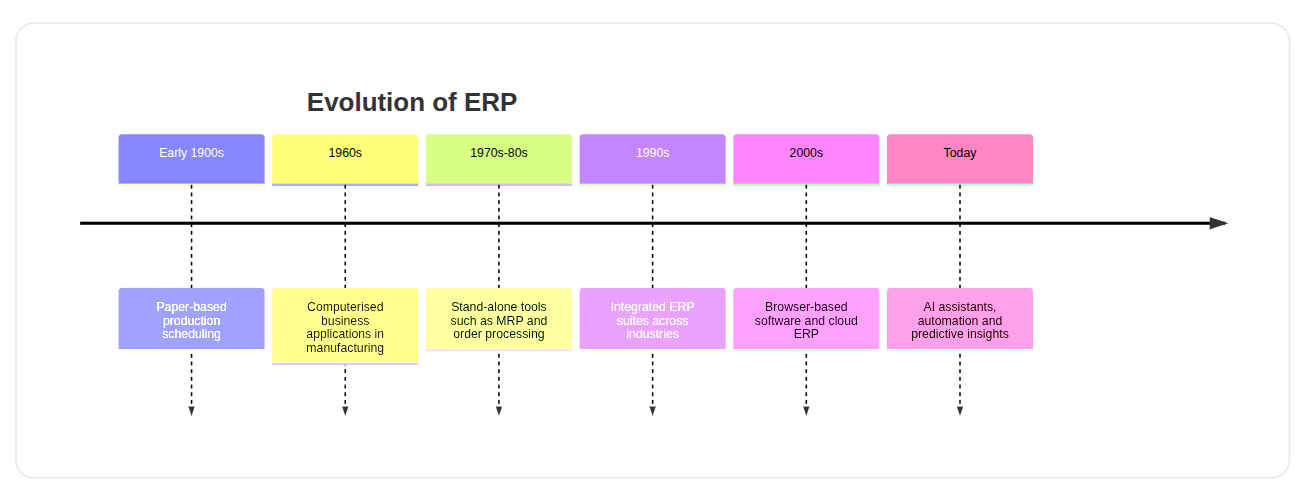
Faster internet, better development tools and cloud computing made ERP affordable and accessible far beyond large manufacturers. Today's systems add generative AI, assistants and predictive analytics that automate routine work and guide decisions.
How Does an ERP System Work?
An ERP system is made of modules. Each module covers one business area, but all modules share a common database, so information entered once is instantly available everywhere.
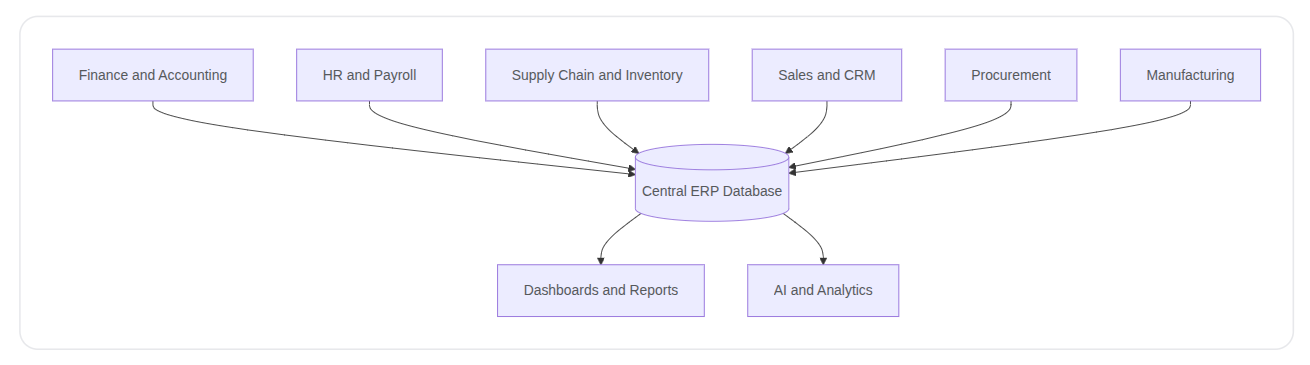
Businesses usually start with the modules they need most, such as finance or inventory, and add more as they grow.
No ERP works in isolation. To be effective it must connect with CRM, HR software, e-commerce platforms, payment gateways, logistics providers and industry-specific tools. This is done through:
APIs for direct, real-time connections
Connectors and custom adaptors for specific applications
Enterprise service bus (ESB) for complex, multi-system environments
iPaaS (integration platform as a service) for cloud-based integration
Why Is ERP Important?
When data lives in one place, every team benefits:
Finance closes the books faster
Sales manages customer orders end to end
Logistics delivers the right product on time
Procurement sources goods and manages suppliers
Accounts payable pays vendors correctly and on schedule
Management gets instant visibility into performance
Banks and investors get accurate, reliable financial records
ERP Use Cases by Industry
ERP looks different in every sector, but the need for accurate, real-time information is universal.
Manufacturing: Control inventory, monitor stock movement, manage quality, asset use and overtime costs.
Retail and e-commerce: Unify in-store and online data, improve order accuracy and support better conversion and order value.
Service companies: Balance project delivery with profitability, resource use and growth.
Utilities: Track capital assets, plan replacements and forecast spare parts so outages are handled without overstocking.
Wholesale and distribution: Cut distribution costs, increase inventory turns and shorten order-to-cash time.
Types of ERP Deployment
There are four common ways to deploy ERP. The right choice depends on budget, compliance needs and IT capability.
Type | What It Means | Best For |
|---|---|---|
Cloud ERP | Hosted by the provider and accessed over the internet as a subscription | Most businesses wanting lower upfront cost, scalability and fast updates |
On-premises ERP | Installed in your own data centre | Organisations needing maximum control and custom infrastructure |
Two-tier ERP | A large ERP at headquarters with a lighter cloud ERP for subsidiaries | Groups going through mergers, expansion or acquisitions |
Hybrid ERP | A mix of cloud and on-premises for different applications | Businesses with regulatory or security constraints moving to cloud gradually |
Cloud ERP is now the most popular option because it lowers upfront cost, scales easily and integrates well with other systems.
Six Key Benefits of ERP
Higher productivity: Automation lets teams do more with fewer resources.
Deeper insights: Removing data silos gives fast, reliable answers to business questions.
Faster reporting: Financial and operational reports are ready in near real time.
Lower risk: Better visibility and control support compliance and help prevent problems.
Simpler IT: Integrated applications sharing one database are easier to maintain.
Improved agility: Real-time data helps you react quickly to new opportunities.
Is Your Business Ready for ERP?
Many companies start with spreadsheets or basic accounting tools, and that is fine early on. But these signs suggest you have outgrown them:
Daily tasks take too long, for example month-end closing keeps getting slower.
Critical data is hard to find, such as revenue per product line or return rates.
Processes are running away from you, especially inventory, costs and customer service.
Teams duplicate data entry across disconnected tools, causing errors and delays.
There is no bandwidth for growth because everyone is busy keeping operations running.
If several of these sound familiar, it is probably time to evaluate ERP.
10 Key Features to Look For in an ERP System
Common database as the single source of truth
Embedded analytics with reporting and self-service BI
Data visualisation through dashboards and KPIs
Automation of tasks and workflows using AI and machine learning
Consistent UI/UX across modules
Integration with third-party software and data sources
New technologies such as generative AI, IoT and mobile support
Reliable technology platform including low-code/no-code and data management
Multinational support for languages, currencies and local regulations
Flexible deployment across cloud, on-premises, two-tier or hybrid
ERP for Every Business Size
Small businesses: Cloud-based ERP that installs quickly and helps move beyond spreadsheets.
Midmarket companies: Modular systems with built-in analytics and rapid deployment that scale with growth.
Large enterprises: Robust platforms with embedded AI, advanced analytics and support for global and subsidiary operations.
ERP Trends to Watch
Generative AI: Automates manual work and lets non-technical users query the system in plain language.
Vertical integration: Industry-specific extensions delivered without painful integration or data silos.
Cloud-first adoption: Anywhere access, lower hardware cost and easier integration continue to drive the shift to cloud.
User personalisation: Customised dashboards, AI-driven search and low-code tools that adapt the software to users, not the other way round.
Common ERP Implementation Challenges
Choosing ERP is only half the journey. Businesses often struggle with:
Unclear requirements and scope
Migrating messy legacy data
Integrating ERP with existing CRM, e-commerce, payment and logistics systems
Low user adoption without proper training and change management
Customisations that add cost and complicate upgrades
A clear roadmap, phased rollout and an experienced implementation partner reduce these risks significantly.
Frequently Asked Questions
What is an ERP system? It is an integrated software platform that manages core business processes such as finance, HR, supply chain, sales and procurement using one shared database.
What is cloud ERP? Cloud ERP is hosted by a provider and accessed through the internet as a subscription. The provider handles maintenance, updates and security.
What is ERP accounting? It is the finance module of an ERP that manages general ledger, payables, receivables, reporting and compliance, and stays in sync with sales, procurement and inventory data.
Can ERP integrate with other software? Yes. Modern ERP systems connect with CRM, e-commerce, payment, HR and logistics tools through APIs, connectors and integration platforms.
Final Thoughts
ERP is no longer only for large manufacturers. Any business that wants accurate data, efficient processes and room to scale can benefit from a unified system. The key is choosing the right deployment model, the right modules and the right integration approach for your stage of growth.
At Teenva AI & Digital Ventures, we help businesses across travel, healthcare, e-commerce and retail plan, build and integrate the systems that keep operations connected, from custom software and system integrations to AI-powered automation and managed IT services.
Ready to Get Your ERP Built or Integrated?
Whether you need a custom ERP solution, want to integrate ERP with your existing CRM, e-commerce or booking platform, or need help planning your implementation, our team is ready to help.
Contact Teenva AI today:
Email: sales@teenvaai.com
Phone: +91 9572020107
Website: teenvaai.com