

How We Built a Car Rental Platform Using CarTrawler API
How We Built a Car Rental Platform Using CarTrawler API
Building a car rental booking system that works reliably in production is harder than it looks. Search endpoints are just the start. The real complexity lives in the booking lifecycle: pricing rules, driver requirements, deposit flows, voucher delivery, cancellations, and reconciliation — all of which must function correctly before you can call your platform production-ready.
This case study walks through how we architected a car rental platform using CarTrawler API integration, covering every layer from supplier connectivity to post-booking operations. The architecture described here is the same pattern we implement for OTAs, travel agencies, hotels, and DMCs through Teenva AI & Digital Ventures.
Platform Context and Business Goals
The client in this case was a mid-sized OTA operating across Southeast Asia and the Middle East. Their existing platform handled flight and hotel bookings but had no ground transportation module. The goals were:
- Add car rentals as a standalone product and as a flight/hotel checkout upsell
- Support prepaid and pay-at-counter booking modes
- Control pricing margins per market and customer segment
- Own the customer data and booking history without dependence on a third-party dashboard
- Handle the full booking lifecycle — not just search and confirm
CarTrawler was selected as the inventory supplier based on its coverage across 190 countries, 43,500+ pickup locations, and proven track record with global travel brands.
System Architecture Overview
The platform was designed in four functional layers:

Each layer was designed to be independently testable. The OTA platform layer owns all customer-facing logic; the integration layer is purely a translator between platform workflows and CarTrawler's API contract.
Phase 1: Search and Availability
Endpoint Design
The search layer handles live availability queries by pickup location, drop-off location, and date range. Key design decisions:
- Location resolution: Pickup and drop-off locations are mapped to CarTrawler location codes via a pre-synced location dictionary. This prevents live lookups on every search and reduces latency.
- Caching strategy: Availability results are cached for a short TTL (typically 3–5 minutes) to handle rapid re-searches without hammering the API. Pricing is always re-fetched at booking time.
- Filtering and sorting: Vehicle class, fuel policy, transmission type, and supplier are filterable at the platform layer, not passed back to CarTrawler on every request.
Availability Response Handling
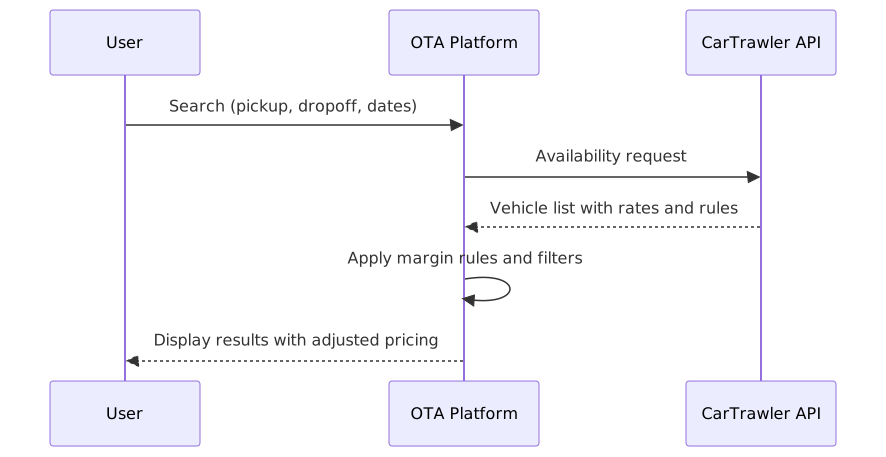
Each result from CarTrawler includes vehicle attributes (class, transmission, capacity), rate breakdown (base rate, taxes, mandatory extras), inclusions (mileage, insurance type), and policy flags (fuel policy, age restrictions). All of these are stored in the session state and displayed to the user before checkout.
Phase 2: Pricing Rules and Policy Display
This is where most integrations cut corners — and where production failures begin.
What Pricing Data Includes
CarTrawler's pricing response contains more than a total amount. It includes:
- Base rate — the rental cost before extras
- Mandatory extras — airport surcharges, taxes, fuel fees
- Optional extras — child seats, GPS, additional drivers
- Deposit / security hold — varies by supplier and market
- Pay-now vs pay-at-counter split — especially important for prepaid vs on-arrival markets
Policy Display Requirements
Our implementation enforces that the following are visible to the user before payment confirmation:
- Driver age requirements and restrictions
- License and ID requirements by market
- Insurance inclusions and exclusions (CDW, theft protection, liability)
- Fuel policy (full-to-full, full-to-empty, pre-purchase)
- Mileage limits and overage rates
- Cancellation penalty windows
Failing to display these is not just a UX problem — it becomes a support cost and a dispute risk when customers arrive at the counter and face unexpected charges.
Phase 3: Booking Creation and Confirmation
Booking Flow
Handling Pricing Changes at Booking Time
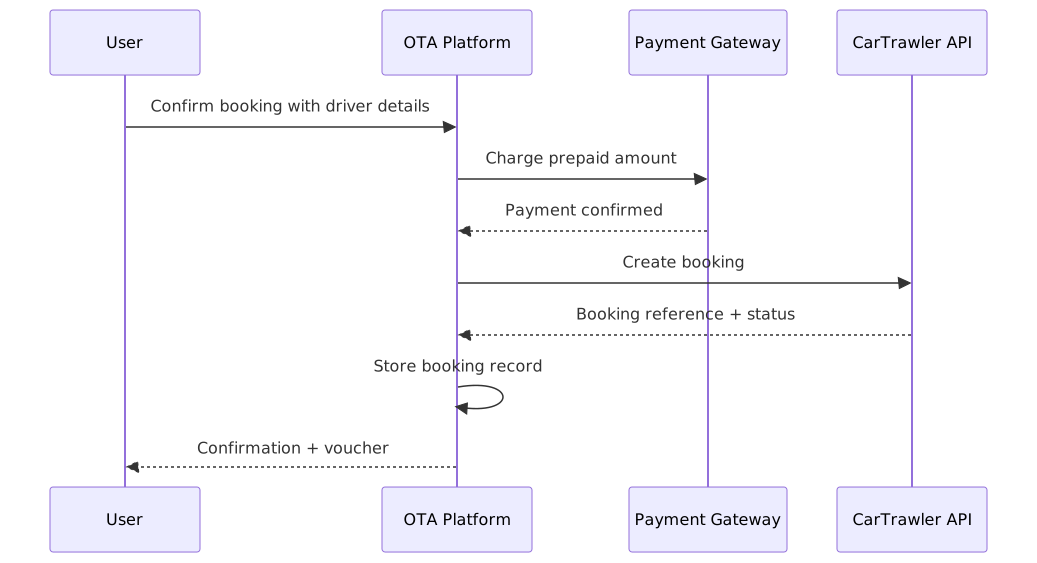
A common failure mode: the rate shown during search has changed by the time the user confirms. Our implementation handles this with a reprice gate — before passing the booking to CarTrawler, the platform re-fetches the rate and compares it against the session price. If the difference exceeds a configurable threshold, the user is shown the updated price and must re-confirm before the charge is processed.
Booking Record Structure
Every confirmed booking stores:
- CarTrawler booking reference
- Booking status and timestamps
- Vehicle details (class, supplier, pickup location, drop-off location)
- Full pricing breakdown (base, extras, taxes, deposit)
- Driver name and contact details
- Cancellation policy snapshot at time of booking
- Voucher content or voucher retrieval link
Storing the cancellation policy snapshot is critical. Policies change. If a customer disputes a cancellation fee six months later, the platform needs the policy that was in effect at the time of booking — not the current one.
Phase 4: Post-Booking Operations
This is what separates production-ready implementations from demo builds.
Voucher Delivery and Retrieval
Vouchers are delivered via email immediately after booking confirmation. The platform also provides:
- Agent-facing booking lookup by reference number or customer identity
- Customer-facing resend flow from the booking management area
- Pickup instruction display including supplier contact details and counter location
For suppliers that return a voucher link rather than voucher content, the platform stores the link with a fallback retrieval trigger if the link is unavailable at the time of display.
Cancellation Handling

The cancellation flow enforces the penalty display step — customers cannot bypass it. Refund processing is tied to the payment gateway and reflects the supplier's refund policy stored at booking time.
Failure Handling
Production handling for the most common failure scenarios:
| Failure Scenario | Platform Response |
|---|---|
| Search timeout | Retry once with exponential backoff; surface user-friendly message if retry fails |
| Price change at booking | Reprice gate — show new price, require re-confirmation |
| Booking creation failure | Store recoverable state; surface support handoff option to user |
| Voucher retrieval failure | Retry on resend; fallback to support escalation with booking reference |
| Cancellation API failure | Retry with idempotency key; flag booking for manual review |
Phase 5: Admin Controls and Margin Management
One of the core requirements for this client was pricing control at the platform level — not dependence on CarTrawler's console.
The admin panel supports:
- Margin rules by market and vehicle class — percentage or flat markup applied to CarTrawler rates before display
- Blackout dates and availability rules — minimum lead time, pickup window restrictions
- User role management — agent, supervisor, and corporate account tiers with different policy access
- Supplier routing controls — ability to suppress specific suppliers per market if commercial terms change
This architecture ensures the platform remains stable even if the supplier relationship or pricing terms evolve.
Phase 6: Reporting and Reconciliation
Finance teams need clean records — not just booking counts.
The reporting module provides:
- Booking reports by date, market, and supplier with full pricing breakdown
- Cancellation and refund reports with policy windows and actual charges
- Commission and payout tracking reconciled against payment gateway records
- Invoice and receipt outputs for corporate accounts
All reports are exportable. Reconciliation runs on a daily schedule and flags discrepancies between platform records and supplier data for manual review.
Go-Live and Production Readiness
The go-live process followed a four-stage rollout:
Stage 1 — Scope and environment setup Confirmed target markets, pickup locations, and booking currency rules. Established CarTrawler credentials and whitelisting. Configured staging environment with booking simulation rules.
Stage 2 — Integration testing Ran test cases across search, pricing, booking confirmation, voucher retrieval, and cancellation. Edge cases included timeout simulation, price change handling, cancellation at the penalty boundary, and voucher resend.
Stage 3 — Policy and payment validation Verified that driver requirements, insurance terms, fuel policy, and cancellation penalties displayed correctly for each target market. Confirmed prepaid and pay-at-counter flows worked end to end.
Stage 4 — Production rollout Deployed with monitoring playbooks, incident response procedures, and defined support SLAs for post-booking requests. First two weeks ran with elevated alerting thresholds.
Results and Operational Outcome
Within three months of go-live:
- Car rentals represented 18% of ancillary revenue from flight bookings
- Post-booking support tickets related to car rentals were below 2% of total bookings — well within target
- Zero critical incidents related to booking creation or payment processing
- Finance reconciliation was fully automated with less than 0.3% discrepancy rate
The platform operated without dependence on any third-party dashboard. All booking records, customer data, and financial reports lived inside the client's own system.
Key Lessons for Teams Building on CarTrawler API
1. Build the booking lifecycle first, not last. Search and pricing are straightforward. Voucher delivery, cancellation handling, and reconciliation are where production systems succeed or fail. Design for those from the start.
2. Store the cancellation policy at booking time. Policies change. Without a snapshot, you cannot defend against disputes or produce accurate refund calculations months after booking.
3. Implement a reprice gate. Rate changes between search and booking are real. Charging a customer without re-confirming the updated price is a disputes and chargeback risk.
4. Own your UI and data. Platform-level control over pricing, policies, and customer records means your business logic is not hostage to a supplier's console or API contract changes.
5. Plan post-booking support before go-live. The most avoidable production failures are in support workflows — voucher resend, booking lookup, and cancellation status tracking. These are not optional features.
Build Your Car Rental Platform with Teenva AI
Teenva AI & Digital Ventures delivers production-ready CarTrawler API integration with full booking lifecycle support, admin-level pricing controls, and multi-vertical compatibility across flights, hotels, tours, and transfers.
Get in touch to discuss your platform requirements:
- Email: sales@teenvaai.com
- Phone: +91 9572020107
- Website: teenvaai.com